

Introduction
When UBR Company approached us to build their online storefront, they had an unusual but exciting requirement: integrate a fully functional, synchronized live radio player directly into their e-commerce platform. Not just a simple audio player, but a true radio experience where all users hear the same song at the same time, regardless of when they tune in.
This article chronicles how we built a production-ready live radio system using Next.js, Sanity CMS, Vercel cron jobs, and the Web Audio API. The result is a great radio experience that feels like traditional broadcast radio, but built entirely with modern web technologies.
The Challenge

Building a synchronized radio player presented several unique challenges:
- Real-time synchronization: All users must hear the same song at the exact same position, regardless of when they join
- Smart song transitions: Songs should transition automatically based on their actual duration, not fixed intervals
- Continuous playback: The radio should loop through the entire music catalog without manual intervention
- Smooth audio control: Volume adjustments shouldn't cause audio artifacts or cutting
- True radio behavior: Users can mute the stream, but the radio keeps playing globally
- Resilient architecture: The system must handle network issues, stale states, and edge cases gracefully
Architecture Overview
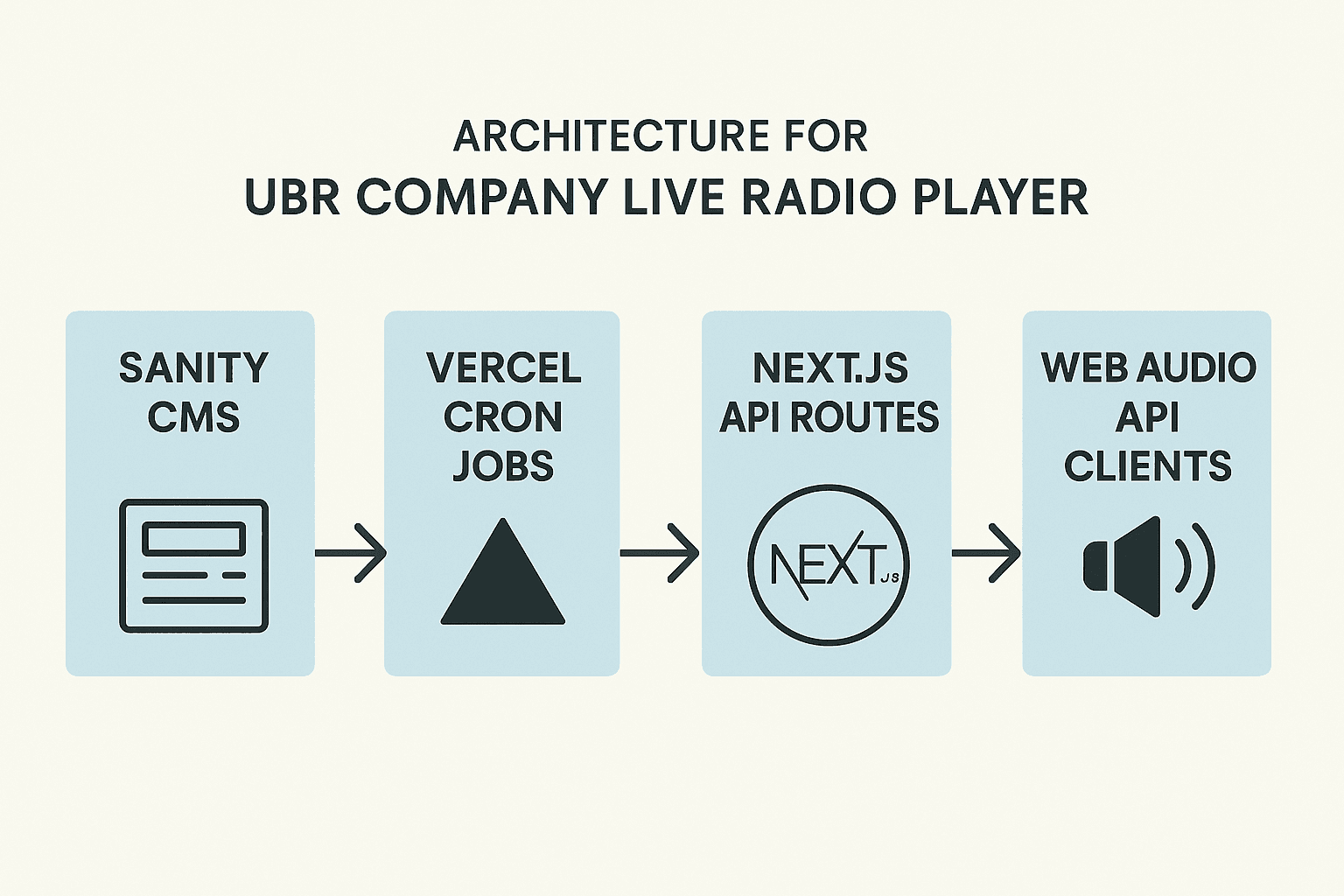
Our solution consists of four main components:
1. Sanity CMS as the State Manager
We use Sanity as both a content management system and a real-time state synchronizer. A single radioState document tracks:
- Current track reference
- Song start time (ISO timestamp)
- Shuffled playlist of all tracks
- Current index in the playlist
- Playing status
This approach gives us several advantages:
- Single source of truth for radio state
- Real-time updates via Sanity Live
- Content editors can see what's currently playing
- Easy to debug and monitor
2. Server-Side Transition Logic
We built a smart transition system using Next.js API routes and Vercel cron jobs. Three API endpoints handle the radio logic:
- /api/radio/state: Returns current radio state with elapsed and remaining time
- /api/radio/transition: Manually triggers a transition to the next song
- /api/radio/check-transition: Cron endpoint that checks if a song should transition based on duration
The cron job runs every 30 seconds, calculating elapsed time from the start timestamp and comparing it to the current track's duration. When a song ends, it automatically transitions to the next track in the shuffled playlist.
3. Client-Side Context and Audio Management
A React Context (LiveRadioProvider) manages the client-side audio playback. Key features include:
- Web Audio API integration for smooth volume control
- Automatic synchronization with server timestamps
- Mute/unmute functionality (instead of pause/play)
- Real-time progress tracking
- Automatic track transitions on the client side
4. UI Components
We built a mobile-responsive radio drawer with:
- Album artwork display
- Track and artist information
- Progress bar with elapsed/remaining time
- Volume slider
- Mute/unmute controls
Implementation Deep Dive
Database Schema
The radioState schema in Sanity is elegantly simple:
1export const radioStateType = defineType({
2  name: "radioState",
3  title: "Radyo Durumu",
4  type: "document",
5  fields: [
6    {
7      name: "currentTrack",
8      type: "reference",
9      to: { type: "track" },
10    },
11    {
12      name: "startTime",
13      type: "datetime",
14    },
15    {
16      name: "isPlaying",
17      type: "boolean",
18    },
19    {
20      name: "playlist",
21      type: "array",
22      of: [{ type: "reference", to: { type: "track" } }],
23    },
24    {
25      name: "currentIndex",
26      type: "number",
27    },
28  ],
29});
Server-Side Transition Logic
The transition system uses a smart algorithm to prevent race conditions and ensure smooth playback:
- Calculate elapsed time: Using the start timestamp, we calculate how many seconds have elapsed since the current song began
- Check remaining time: Compare elapsed time to the track's actual duration
- Transition only when needed: If remaining time is ≤ 0, trigger a transition
- Update state atomically: Set new track, reset start time, and increment playlist index in a single operation
This approach ensures that even if multiple requests arrive simultaneously, the system handles them gracefully with a 10-second buffer zone to prevent duplicate transitions.
Client-Side Synchronization
The real magic happens in the LiveRadioContext. Here's how we maintain perfect synchronization:
- Server-based timing: Instead of relying on the audio element's currentTime, we calculate the actual position based on the server's start timestamp
- Periodic sync checks: Every 100ms, we verify the audio position matches the calculated server time
- Automatic drift correction: If the difference exceeds 2 seconds, we automatically seek to the correct position
- Real-time state updates: When the server transitions to a new song, all clients receive the update and switch tracks automatically
Web Audio API Integration
Early versions used the basic HTML5 audio element, which caused audio cutting when adjusting volume. We solved this with the Web Audio API:
1const audioContext = new AudioContext();
2const gainNode = audioContext.createGain();
3const source = audioContext.createMediaElementSource(audioElement);
4source.connect(gainNode).connect(audioContext.destination);
This setup allows us to adjust volume through gain nodes without affecting the audio stream, resulting in smooth, artifact-free volume control.
Handling Edge Cases
We built several safeguards to handle edge cases:
- Stale state detection: If elapsed time exceeds duration + 5 minutes, automatically reinitialize the radio
- Missing state recovery: If no radio state exists, automatically initialize with a shuffled playlist
- Network failure resilience: Client-side timers continue tracking even if API calls fail
- Browser autoplay policies: Graceful handling of autoplay restrictions with fallback UI
- Concurrent transition prevention: Buffer zones and state checks prevent duplicate transitions
Deployment and Infrastructure
Vercel Cron Jobs
We use Vercel's built-in cron job functionality to check for transitions every 30 seconds:
1{
2  "crons": [{
3    "path": "/api/radio/check-transition",
4    "schedule": "*/30 * * * *"
5  }]
6}
This is more efficient than having every client check independently, and ensures smooth transitions even when no clients are connected.
Initialization Script
We created a one-time initialization script that:
- Fetches all tracks from Sanity
- Shuffles them into a random playlist
- Creates the initial radio state document
- Sets the first track as current with proper timing
The script runs automatically during the build process via the vercel.json configuration.
User Experience Highlights
Mobile-First Design
The radio drawer slides up from the bottom on mobile devices, providing an immersive experience without blocking the shopping interface. On desktop, it appears as a persistent player at the bottom of the page.
Real Radio Behavior
Unlike typical audio players with play/pause buttons, our radio implements mute/unmute. This maintains the radio metaphor: the station keeps broadcasting, but you can choose to listen or not.
Visual Feedback
The UI shows:
- Current track artwork and metadata
- Real-time progress bar
- Elapsed and remaining time
- Visual indication of mute state
- Smooth volume slider
Performance Considerations
Optimizations
- Lazy audio initialization: The audio element is created only when needed
- Event listener cleanup: Proper cleanup prevents memory leaks
- Efficient state updates: Using refs to avoid unnecessary re-renders
- CDN-hosted audio: Sanity's asset CDN ensures fast, global audio delivery
- Progressive loading: Audio preloads while the UI is interactive
Caching Strategy
The radio state endpoint uses a smart caching strategy:
1Cache-Control: public, max-age=10, s-maxage=10, stale-while-revalidate=30This balances freshness with performance, allowing 10-second caching while serving stale content during revalidation.
Lessons Learned
1. Server Time is the Source of Truth
Initially, we tried to rely on client-side audio elements for timing. This led to drift and desynchronization. Moving to server-based timestamps solved this completely.
2. Cron Jobs Beat Client Polling
Having a centralized cron job handle transitions is more reliable and efficient than having every client check independently.
3. Edge Cases Matter
The production environment revealed edge cases we never encountered in development: stale states after deployments, race conditions during high traffic, and browser autoplay policies all required specific handling.
4. Web Audio API is Essential
For any serious audio application, the Web Audio API is non-negotiable. The basic audio element is too limited for smooth user experiences.
Future Enhancements
While the current implementation is production-ready, we have ideas for future improvements:
- DJ Chat Integration: Live chat synchronized with the current song
- Song Requests: Allow users to vote for upcoming tracks
- Analytics: Track most popular songs, peak listening times, etc.
- Schedule Programming: Different playlists for different times/days
- Multi-station Support: Multiple radio channels with different genres
- Progressive Web App: Background playback on mobile devices
Technical Stack Summary
- Frontend: Next.js 15 with App Router, React 19, TypeScript
- Backend: Next.js API Routes, Vercel Serverless Functions
- Database/CMS: Sanity CMS with real-time subscriptions
- Audio: Web Audio API, HTML5 Audio Element
- Scheduling: Vercel Cron Jobs
- Styling: Tailwind CSS, shadcn/ui components
- Deployment: Vercel with automatic deployments
Conclusion
Building a synchronized live radio player was one of the most technically interesting challenges in the UBR Company project. By combining modern web technologies with creative solutions, we created an experience that feels like traditional broadcast radio while leveraging the flexibility and power of web platforms.
The key to success was treating the radio as a distributed system problem: establishing a single source of truth (Sanity), implementing smart synchronization logic (server timestamps), and building resilient client code that gracefully handles edge cases.
For e-commerce brands with strong music connections, integrating a radio player creates a unique brand experience that keeps users engaged while they browse. It transforms a transactional shopping experience into an immersive brand interaction.
The complete source code architecture demonstrates that complex, real-time features can be built with standard Next.js infrastructure—no specialized streaming servers or complex WebSocket setups required. Just smart use of existing tools and careful attention to timing and synchronization.
Resources
- Overbooked for all the prototypes we've generated: overbooked.app
- Next.js Documentation: nextjs.org/docs
- Sanity CMS: sanity.io
- Web Audio API: MDN Web Audio API
- Vercel Cron Jobs: vercel.com/docs/cron-jobs
- Listen to UBR Radio: ubrcompany.com/radyo